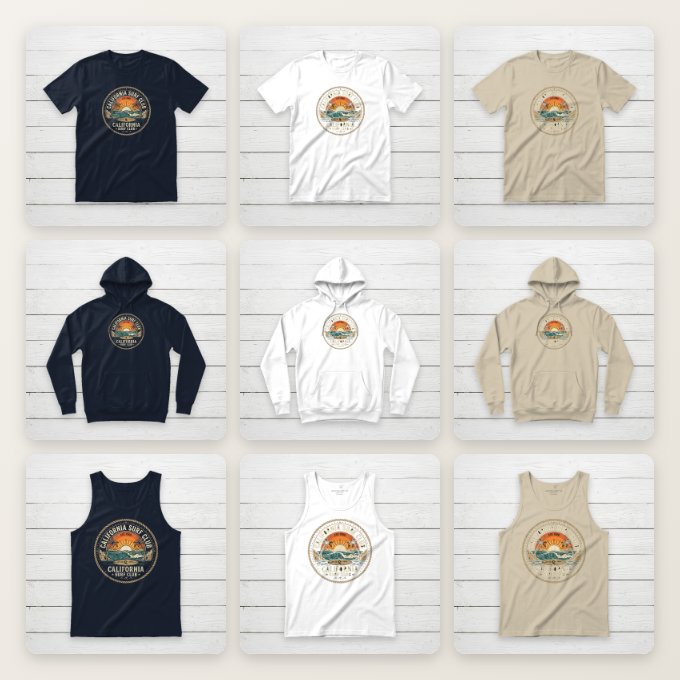
Two ways to export in bulk
One design → every variant. Set up your mockup once in the
editor, click Batch Export, and tick the garments and fabric
colors you sell. Every combination renders automatically — 3 garments × 3 colors is 9
mockups, like the grid above, which is a real unedited export. Files come back named and
ready to upload (hoodie-classic-white.png, tank-top-sand-beige.png).
Many designs → one template. Get a single mockup looking exactly right, then drop in up to 100 design files. Each renders on the same garment, color, background, and placement — the fastest way to give a whole shop a consistent, professional look.
Placement that follows the garment
Bulk tools usually paste your design at the same pixel position on every template, which puts prints on hoodie pockets and polo plackets. Here, your placement is converted to each garment's real printable area — measured per garment — so the design lands where a print shop would put it. Or choose Snap to Center Chest for the standard 11″ print, automatically sized to each garment's width. The measurements follow our placement & size guide.
How it compares
| FreeTeeMockup | Typical mockup platforms | |
|---|---|---|
| Bulk / batch export | Free, unlimited | Paid add-on or subscription-metered |
| Signup | Not required | Account required for bulk |
| Watermark | None | Common on free tiers |
| Where files are processed | In your browser — designs never uploaded | Cloud servers |
| Output | ZIP of named PNGs, 1000px or 2000px | Varies; often per-image downloads |
Comparing specific tools? See how we stack up against Placeit, Mockey.ai, and Canva.
Built for print-on-demand sellers
- Etsy listings: switch the canvas to Etsy Listing (2700×2025) for zoom, and fill your ten image slots with variants — our Etsy mockup guide shows which ones convert.
- Shopify stores: a consistent template across every product page — see mockups for Shopify.
- Any garment you sell: crewneck, hoodie, sweatshirt, tank top, v-neck, long sleeve, polo, and ladies tee.
For the full walkthrough with tips, read the batch export guide on the blog.
Frequently asked questions
Is the bulk mockup export really free?
Yes. No signup, no watermark, no daily cap. All rendering happens locally in your browser, so there's no server cost that would require a paid tier.
How many t-shirt mockups can I generate at once?
Variant mode renders every combination of your selected garments (up to 8) and fabric colors in one run. Design mode accepts up to 100 design files rendered on your chosen template.
Will my design be positioned correctly on every garment?
Yes — your placement is mapped onto each garment's real printable area, or you can snap every variant to a standards-accurate 11″ center chest print, sized per garment.
What do I get from a batch export?
One ZIP with a PNG per mockup at 1080×1080, or 2160×2160 at 2×, named by garment and color or by design file name — ready for Etsy, Shopify, Amazon Merch, or any POD marketplace.
Export your first batch
One design in, every variant out — free, no signup, no watermark.
Try Batch Export Free