Batch export: make 50 t-shirt mockups in one click (still free)
If you sell shirts online, you already know the grind: one design becomes a black tee, a white tee, a navy hoodie, a sand sweatshirt, a tank for summer — and every one of those needs its own listing image. Five colors across three garments is fifteen exports. Do that for ten designs and you've spent an afternoon clicking download.
That grind is now one click. TeeMockup's new Batch Export renders every combination you select and hands you a single ZIP of ready-to-list PNGs — free, no signup, no watermark, with everything processed locally in your browser.
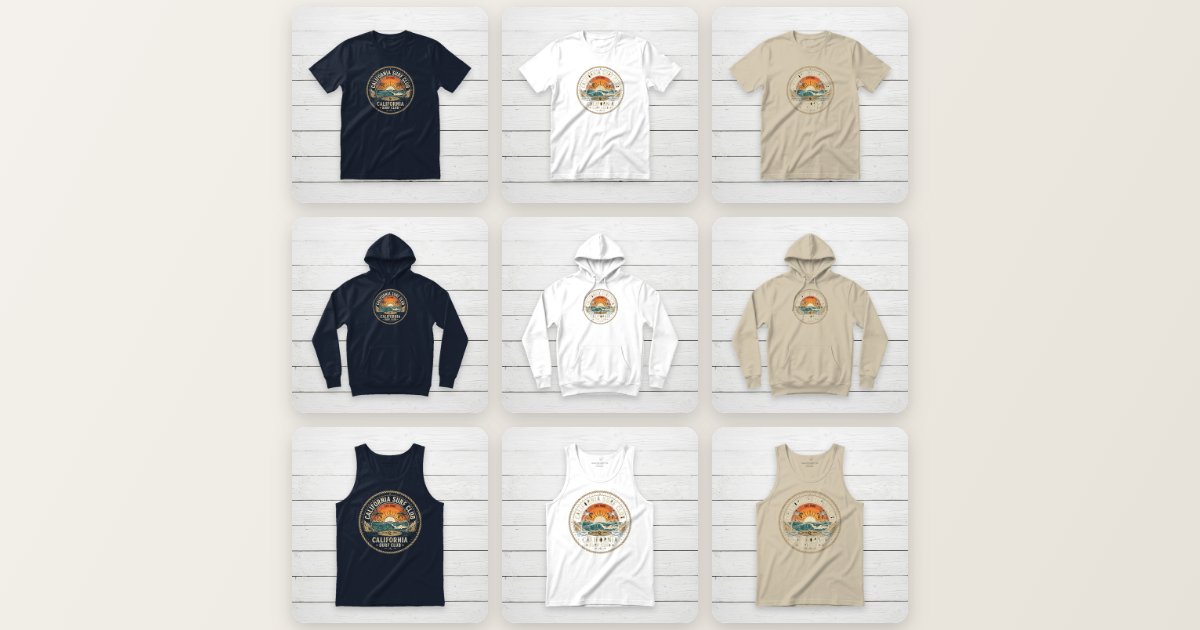
The grid above is a real, unedited batch export: one surf design, three garments, three colors, nine finished mockups — about fifteen seconds of rendering.
Mode 1 — One design, every variant
This is the mode for building a listing's image set:
- 1. Set up your mockup as usual. Open the free editor, upload your design, and position it the way you want.
- 2. Click Batch Export. It's right next to the download button.
- 3. Tick your garments and colors. All eight garments — crewneck, hoodie, sweatshirt, tank top, v-neck, long sleeve, polo, and ladies tee — plus the full fabric color palette. The live counter shows exactly how many images you'll get.
- 4. Export. A progress bar runs through every combination and the ZIP
downloads automatically, with files named by garment and color
(
hoodie-classic-white.png,tank-top-sand-beige.png, …).
The clever part: placement that follows the garment
Copying the same design position onto different garments usually breaks things — a print centered on a tee lands on a hoodie's pocket, or under its drawstrings. Batch Export avoids this by converting your placement into coordinates relative to each garment's real printable area, which we've measured for all eight garments: the print zone stops above kangaroo pockets, starts below plackets and hoods, and respects each garment's actual width.
Prefer standards over eyeballing? Choose Snap to Center Chest and every variant gets the classic 11-inch center chest print, automatically sized per garment — an 11″ print is proportionally bigger on a 16.5″ tank top than on a 22″ hoodie, exactly like a real print shop would do it. The measurements come from our design placement & size guide.
Mode 2 — Many designs, one template
The second tab flips the equation for catalog work. Get one mockup looking exactly right —
garment, color, background, placement — then drop in a whole folder of design files (up to
100). Each one is rendered on that same template and named after its file, so
retro-sunset.png comes back as a finished
retro-sunset-crewneck-tee.png mockup.
This is the fastest way to produce a consistent-looking shop: every listing shares the same garment, angle, and lighting, which reads as professional the moment a buyer opens your storefront. Designs with solid backgrounds get the same automatic background removal as the regular editor.
Why this is free when competitors charge for it
Bulk export is precisely the feature other mockup tools put behind a paywall — it's a paid add-on on Mockey and metered by subscription on Placeit. We compared the alternatives in detail in our honest comparison, but the short version: TeeMockup renders everything in your browser, so a 50-mockup batch costs us the same as a single download — nothing. There's no server bill forcing a premium tier, which is the same reason there's no watermark and no signup anywhere else on the tool.
Practical tips for batch runs
- Match your real catalog. Only tick garments you actually sell — a mockup of a garment that ships differently causes returns.
- Switch the canvas to Etsy Listing for marketplace zoom. Etsy recommends 2000px+ images and that preset exports 2700×2025; the quality toggle applies to the whole batch. For social posts, the 1:1 preset at 1× keeps the ZIP light.
- Check contrast per color. A black design disappears on the black fabric variant. Glance over the grid and drop colors that fight your artwork — the selection is per-run, so it's one unticked box.
- Selling on Etsy? Our guide to Etsy listing photos for print-on-demand shows exactly which variants belong in your ten image slots.
Frequently asked questions
Is bulk t-shirt mockup export really free?
Yes. No signup, no watermark, no daily cap. Everything renders locally in your browser, so there's no server cost that would force a paid tier.
How many mockups can I export at once?
Variant mode exports every combination of your selected garments (up to 8) and fabric colors (the preset palette plus your custom color). Design mode accepts up to 100 design files in one run.
Does my design stay in the same position on every garment?
Your placement is mapped onto each garment's real printable area, so it lands correctly on every garment — below a hoodie's drawstrings, above its pocket, under a polo's placket. Or snap everything to a standards-accurate 11″ center chest print.
What files do I get?
One ZIP with a PNG per mockup at 1080×1080, or 2160×2160 at 2×, named by garment and color or by design file name — ready to upload straight to your store.
Export your first batch
Set up one mockup, tick your garments and colors, and download the whole set — free.
Try Batch Export