How to create Etsy listing photos for print-on-demand shirts
Print-on-demand has a photography problem: the shirt doesn't exist until someone buys it. You can't photograph inventory you don't hold — and yet your listing competes against thousands of others on photos alone. In Etsy search, buyers see your thumbnail, a price, and star count. That's the whole pitch.
The fix is a deliberate photo plan built from mockups. Here's the version that works: what goes in each of Etsy's ten photo slots, the thumbnail rules that decide your click-through rate, and the specs that keep images sharp under zoom.
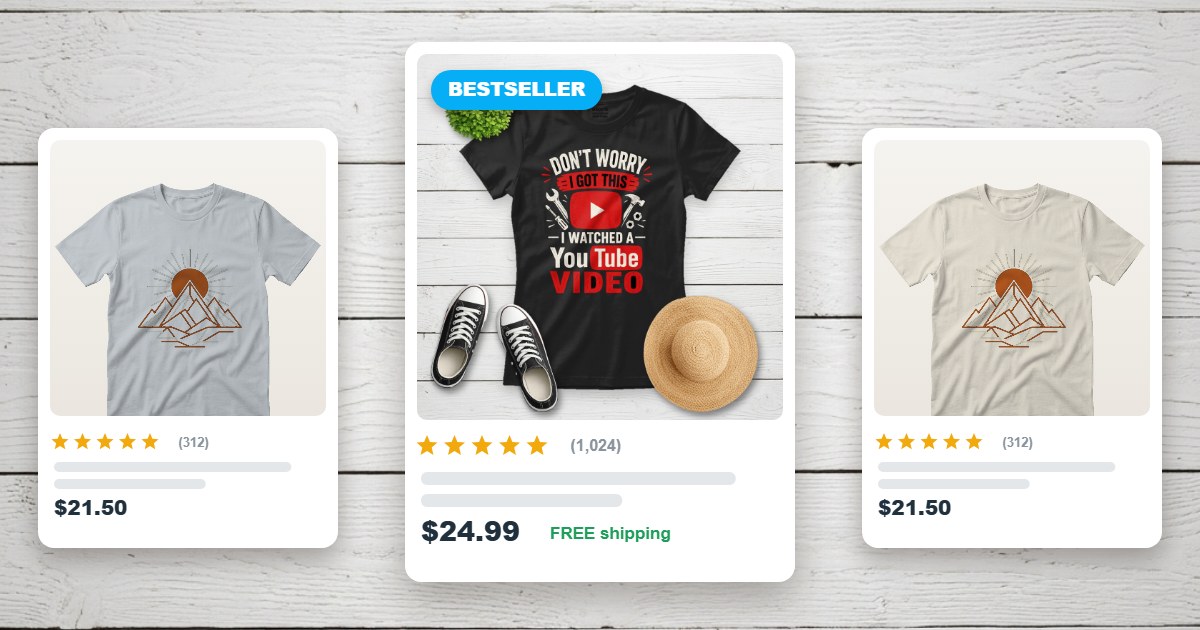
The thumbnail decides everything
Photo #1 does 90% of the work — it's the only image buyers see before clicking. Three rules for it:
- Design it for the crop. Etsy search thumbnails display at roughly 4:3 landscape, cutting the top and bottom of square images. Keep the shirt centered with margin on every side so nothing important gets cropped.
- Test it at 300 pixels. Shrink your hero image to thumbnail size. If the design turns to mush, simplify the composition — a clean flatlay on a light background wins at small sizes (dark, busy lifestyle scenes lose).
- One shirt, not five. Multi-product hero images read as clutter in search. Show the variants in slots 2–10 instead.
What to put in all ten slots
A photo set that answers every pre-purchase question, in order:
- 1. Hero mockup — clean flatlay, light background, thumbnail-safe crop. Make it in the free editor in under a minute.
- 2. Design close-up — a tight crop on the artwork so buyers can inspect line work and texture.
- 3–4. Color and garment variants — the same design on the other colors and cuts you sell: ladies tee, hoodie, v-neck. Regenerating a mockup per variant takes seconds.
- 5. Size chart — a simple graphic with your provider's measurements. This is your biggest return-prevention tool.
- 6. Placement/scale reference — the shirt with the print shown at true size (our placement guide has the measurements buyers expect).
- 7. Fabric & quality card — weight, material, feel; pull the details from your print provider's spec sheet.
- 8. Back print or detail shot — if the shirt has one; otherwise a second lifestyle angle.
- 9. Gift framing — shirts are gifts; one image suggesting the occasion ("dad's birthday", "hiking buddy") widens your buyer pool.
- 10. Care & shipping card — washing instructions and production timeline. Sets expectations, prevents one-star surprises.
Slots 5–10 are graphics, not mockups — make them once as templates, then reuse them across every listing in your shop. Only slots 1–4 change per design.
Image specs that pass Etsy zoom
- At least 2000px on the shortest side — Etsy's zoom feature needs the resolution, and zooming is what serious buyers do before purchasing.
- JPG for photos, sRGB color — smaller files, faster listing loads.
- Consistent background across your shop — when every listing uses the same flatlay style, your shop page looks like a brand instead of a garage sale.
- No watermarks, ever — a watermarked mockup image screams "I used a free trial" and erodes exactly the trust a listing photo exists to build. (Every mockup from the TeeMockup editor is watermark-free.)
The mistakes that kill click-through
- Printing too low or too big on the mockup — buyers notice placement even when they can't articulate it; use the standard measurements.
- Text-heavy thumbnails — "BUY 2 GET 1 FREE" banners on the hero image look like ads and get scrolled past.
- The same image ten times — ten slots of one angle answers no questions and wastes the biggest free real estate Etsy gives you.
- Mockups that don't match the product — if your provider ships a Gildan crewneck, don't mock up a fitted tri-blend. The disappointment shows up in reviews.
The full workflow, start to finish
New listing? The photo set takes about fifteen minutes: make the hero and variant mockups in the free mockup generator (our step-by-step guide covers it), drop your reusable template graphics into slots 5–10, and upload. For deeper marketplace-specific advice, see the dedicated t-shirt mockups for Etsy page — and if you're weighing tools, the free generator comparison shows what each option actually gives you.
Frequently asked questions
Can I use mockups instead of real photos on Etsy?
Yes — mockups are the standard for print-on-demand listings, since the product doesn't exist until someone orders it. Just make sure the mockup accurately represents the garment your provider ships.
How many photos should an Etsy listing have?
Use all ten slots. Listings with a full photo set give buyers more reasons to stay, answer sizing and quality questions before they're asked, and signal an established shop.
What size should Etsy listing photos be?
Etsy recommends at least 2000 pixels on the shortest side so zoom works. Search thumbnails crop to roughly 4:3 landscape, so keep the shirt centered with breathing room on all sides.
Do listing photos affect Etsy search ranking?
Indirectly, yes. Etsy's search rewards listings that convert; the thumbnail drives click-through rate, and the photo set drives purchases. Better photos compound into better ranking over time.
Make your hero mockup now
Photo #1 of your next listing is 60 seconds away — free, no signup, no watermark.
Open the Free T-Shirt Mockup Generator